
How to Stop Spam Registration on Your Site
Protect your site from fake sign-ups with layered defenses—CAPTCHAs, honeypots, email/IP validation, rate limits, and risk scoring to reduce spam while keeping UX smooth.
Spam registrations can overwhelm your site with fake accounts, skew analytics, and damage your brand. These bots exploit vulnerabilities in your registration process, leading to database overload, email deliverability issues, and potential security breaches. Protecting your site requires a layered defense approach that balances security with user experience.
Key Takeaways:
- Why It Matters: Spam accounts harm your platform by overloading resources, distorting data, and eroding user trust.
- Signs of Spam: High volumes of sign-ups in seconds, disposable email domains, repeated IPs, and mismatched geolocations.
- Top Solutions:
- Use CAPTCHAs (e.g., Google reCAPTCHA v3 or Cloudflare Turnstile) and honeypots to block bots.
- Implement email verification and IP reputation checks.
- Restrict access via geolocation, domain blacklists, or manual approvals.
- Add rate limits to prevent abuse and monitor suspicious activity.
By combining tools like Web Application Firewalls, email validation APIs, and behavior analysis, you can reduce spam registrations by up to 99%. Regularly review and update your defenses to stay ahead of evolving tactics.
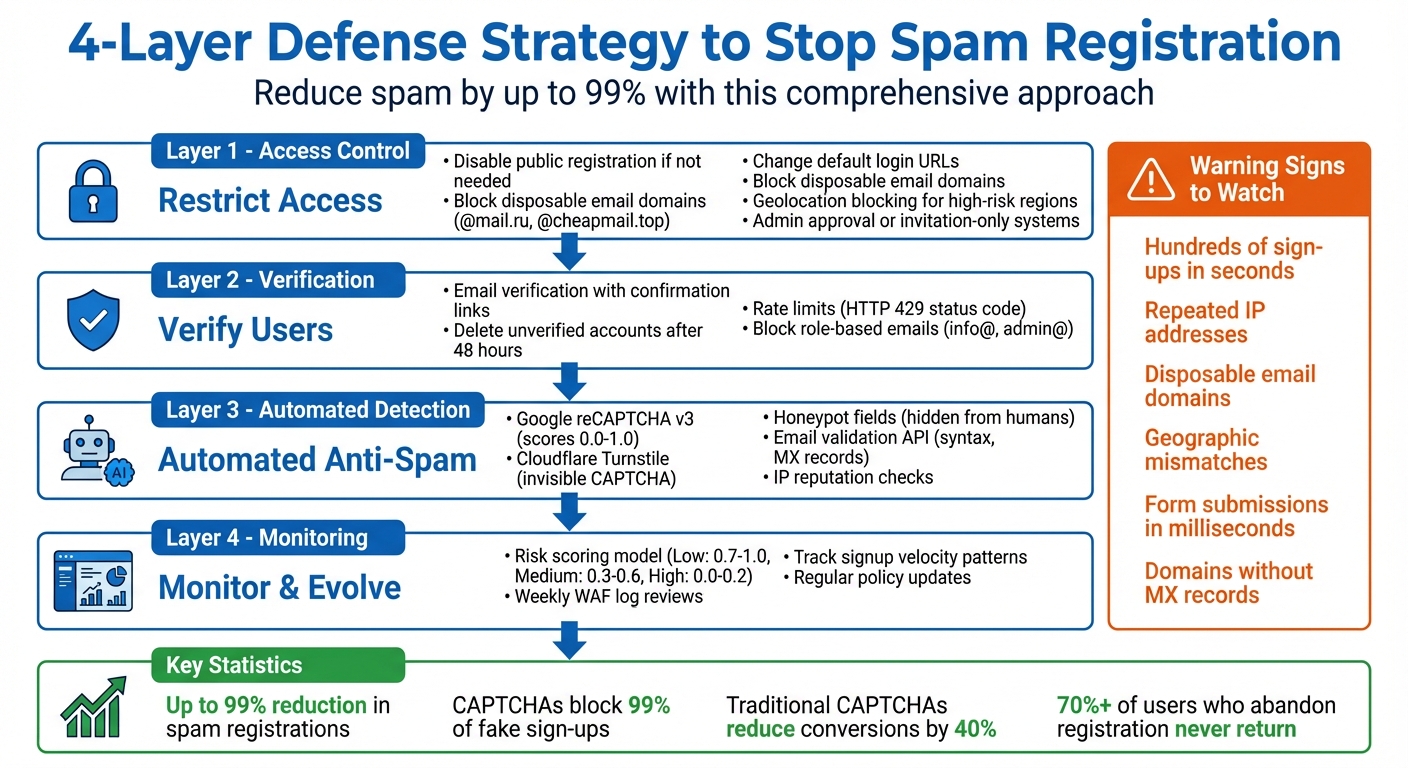
4-Layer Defense Strategy to Stop Spam Registration
Assessing Your Current Registration Process
Before you can strengthen your defenses, it's crucial to pinpoint where your current registration system might be vulnerable. Start by checking if your registration form uses entry points that bots can easily exploit. For example, WordPress sites often use the default URL domain.com/wp-login.php?action=register, which is a common target for automated scripts scanning thousands of domains. If you're still relying on this default setup without any added protections, your site could be wide open to automated attacks.
Make sure your forms include essential safeguards like email activation and CAPTCHA. These simple measures can block up to 99% of fake sign-ups. On the other hand, forms that allow instant account creation without email confirmation are prime targets for spambots. Take a close look at your logs for red flags such as hundreds of sign-ups happening within seconds, repeated IP addresses, or entries filled with nonsensical text. Duncan Elder from MailerLite puts it bluntly:
Spambots are the Terminators of the internet. They're machines that relentlessly pursue their target–your email signup forms–causing harm and disruption to your business.
Another telltale sign of bot activity is unnaturally fast form submissions. Bots can complete forms in mere milliseconds. Also, review the email domains in your database. According to Shield Security, domains without MX records indicate no intention to receive emails, signaling a potential spam account. Disposable email domains are another red flag, as they are often used for high-risk sign-ups. Geographic mismatches can also be revealing. For instance, if your U.S.-based business suddenly sees thousands of registrations from Eastern Europe overnight, it's a strong indicator of an attack.
To make this analysis more efficient, tools like AbuseReport.org's email and IP validation APIs can help. These tools quickly identify patterns like abusive IP addresses and disposable email domains - tasks that would otherwise take hours to complete manually. By running your existing user database through these validation checks, you can uncover suspicious activity and establish a baseline for what normal user behavior looks like. This groundwork is essential for building stronger anti-spam defenses in the next steps.
Strengthening Your Registration Workflow
Securing your registration workflow is essential to protect your site from vulnerabilities. If public sign-ups aren't necessary, disable them by navigating to Settings > General. If you do need open registration, consider changing the default URL for your login or registration page. Plugins like WPS Hide Login can make this process simple and help keep bots from easily finding your forms. These small changes can significantly strengthen your site's entry points before layering on additional defenses.
Restricting Registration Access
Every measure you take builds a stronger barrier against spam and unauthorized access. If your site requires public registration, you can fine-tune access with domain whitelists or blacklists. For instance, block disposable email domains like @mail.ru or @cheapmail.top and reject role-based email addresses such as info@ or admin@. If your business operates in specific regions, geolocation blocking can restrict registrations from areas outside your service zone.
For sites requiring higher security - like membership platforms or admin accounts - consider an admin approval process. Tools such as WP Approve User or New User Approve ensure no account becomes active without manual review. An invitation-only system can take security even further, allowing only pre-vetted individuals to register using unique links.
Adding Verification and Rate Limits
Once you've controlled who can register, the next step is verifying accounts and protecting system resources. Email verification ensures that only confirmed accounts remain active. Automatically deleting unverified accounts after 48 hours is a great way to keep your database clean and manageable.
Rate limits are another critical layer of protection. By setting limits, you can prevent bots from overwhelming your system. Configure your server to return an HTTP 429 (Too Many Requests) status code when limits are exceeded. Adding a Retry-After header lets legitimate users know when they can try again. To avoid system-wide disruptions, partition rate limits by IP address so that a single bad actor can't monopolize your resources.
Using U.S.-Standard Logging Practices
Keep detailed logs of every registration attempt using U.S. formats (MM/DD/YYYY and 12-hour clock). Be sure to capture information like IP addresses, timestamps, email domains, and registration statuses. Integrating AbuseReport.org's API can help flag suspicious activity as it happens, adding an extra layer of oversight to your registration process.
Implementing Automated Anti-Spam Measures
Once you've strengthened access controls and added verification steps, automation can take your defenses up a notch. Automated tools are great for filtering out bots and fraudulent activity without disrupting genuine users. The trick is to find systems that strike the right balance between strong protection and a smooth registration experience. Let’s dive into some automated measures that can help keep your platform secure while ensuring a seamless experience for real users.
Integrating CAPTCHA and Honeypots
Traditional CAPTCHAs often come with a downside - they can cut conversion rates by up to 40%. To address this, newer invisible solutions like Google reCAPTCHA v3 and Cloudflare Turnstile have become popular. These systems don’t rely on visible challenges but instead analyze user behavior, such as cursor movements, device history, and cookies. Cloudflare explains:
The latest versions of reCAPTCHA are able to take a holistic look at a user's behavior and history... without providing the user with a challenge to complete.
For example, reCAPTCHA v3 assigns a risk score to every interaction, ranging from 0.0 (high risk) to 1.0 (likely human). You can set thresholds to automatically block suspicious registrations or add extra verification for borderline cases. If you prefer to avoid Google-based tools, Cloudflare Turnstile offers a free, invisible alternative and doesn’t require you to be a Cloudflare customer.
Honeypots work well alongside CAPTCHAs by quietly detecting bots. These hidden form fields are invisible to human users but are often filled by bots. When a bot interacts with a honeypot field, the system blocks the registration instantly - without inconveniencing real users. For smaller sites, simple math challenges like "2 + 3 = ?" provide an easy way to stop basic bots while keeping things user-friendly.
Validating Email Addresses and Domains
After initial verification, validating email addresses helps tighten the net around spam. AbuseReport.org's email validation API checks several factors during sign-up, including syntax, domain existence, MX records, and flags for disposable or role-based emails. Blocking temporary email providers like @10minutemail.com or @guerrillamail.com can prevent misuse of free trials or the creation of throwaway accounts.
For added security, consider combining automated validation with double opt-in email verification. This involves sending a confirmation link to the provided email address and deleting unverified accounts after a set period, such as 48 hours.
Using IP Reputation and Geolocation Data
IP reputation tools are another effective layer of defense, helping identify registrations from VPNs, proxies, or IP addresses with a history of malicious behavior. As of December 29, 2025, the United States and China are the largest sources of spam globally, each scoring 7.80 in spam volume. Meanwhile, countries like Bangladesh have seen sudden spikes, with a +28.19% increase in spam activity recorded in just one day.
AbuseReport.org's IP tools assign risk scores to connection attempts, flagging high-risk IPs immediately. Chris Chukwunyere from Gzi shared his experience:
After consulting with wpmudev support, I changed the page through which spam registrations were made on my site to be blocked by WAF, and to my surprise, the malicious bots have now taken to their heels!.
Geolocation data can also be used to manage registrations from high-risk regions. For instance, you could flag registrations from these areas as pending, giving you more control while avoiding unnecessary rejections of legitimate users who might be traveling or using corporate VPNs.
Monitoring and Evolving Your Anti-Spam Setup
Keeping spam at bay isn’t a one-time task - spammers are constantly changing their tactics. To stay ahead, you need to regularly fine-tune your defenses. This ensures your registration process stays secure without causing unnecessary friction for genuine users.
Building a Risk Scoring Model
A risk scoring model works by evaluating each registration attempt based on multiple factors, combining them into a single score. Instead of relying on just one indicator, strong models integrate signals like IP intelligence, device fingerprinting, behavioral analysis, and signup velocity to form a more complete picture. For instance, Google reCAPTCHA v3 assigns scores ranging from 0.0 (high risk) to 1.0 (likely human). To maintain accuracy, these tokens should be validated within two minutes.
Rather than a simple block-or-allow system, it’s better to use graduated responses. For example:
- Low-risk users (scores 0.7–1.0): Allow them to proceed without delays.
- Medium-risk users (0.3–0.6): Require additional steps like email or SMS verification.
- High-risk users (0.0–0.2): Block or flag them for manual review.
Services like AbuseReport.org's API can simplify this by providing real-time risk assessments, checking factors like IP reputation, email quality, and VPN usage. Advanced models can also include signals such as browser tampering or the use of incognito mode. As Fingerprint explains:
The real magic happens when you layer these techniques. By combining device intelligence, behavioral cues, IP analysis, and velocity monitoring, you can spot and stop spam accounts before they ever get a chance to wreak havoc.
To get started, monitor user behavior to establish a baseline of normal activity. This helps you set thresholds that minimize false positives while catching suspicious activity. These risk scores then feed into your ongoing monitoring strategies.
Conducting Regular Monitoring and Reviews
Once your risk scoring system is up and running, regular monitoring is essential to spot new spam trends. Review your Web Application Firewall (WAF) and security logs weekly to identify attack sources, blocked requests, and triggered rules. Keep an eye on signup velocity from specific devices, IP addresses, or geographic regions to detect coordinated bot attacks in real time.
Look for red flags like generic usernames, suspicious email domains, or accounts that remain inactive. Kacie Cooper suggests:
Create a checklist of red flags to look for when reviewing registrations. Common signs of fake accounts include generic usernames, suspicious email patterns, and incomplete profile information.
Using smart tags in form notifications to capture IP addresses for each registration can also help you manually block repeat offenders. Don’t forget to periodically adjust your risk scoring thresholds - what worked a few months ago might need updating as spammers adapt. Regular reviews not only help you stay ahead of new spam tactics but also guide necessary updates to your policies.
Maintaining Policies and Compliance
As spammers evolve, it’s crucial to revisit your policies periodically to ensure your defenses remain strong. At the same time, staying compliant with U.S. privacy laws protects both your users and your business. Update blocklists regularly, document policy changes, and confirm that your email verification practices meet CAN-SPAM requirements.
For industries with strict regulations, privacy-focused tools like Cloudflare Turnstile can be a good choice. Fake accounts in regulated sectors can disrupt Know Your Customer (KYC) processes and even trigger legal requirements in the event of a data breach.
Strike a balance between security and user convenience by using methods like honeypots - fields that are invisible to legitimate users but can trap bots. Keep thorough documentation of your IP banning and data collection policies, and review WAF logs to ensure you’re not accidentally blocking genuine users.
Regular maintenance of your anti-spam measures not only keeps them effective but also ensures they respect user privacy and accessibility.
Conclusion: Building a Spam-Free Registration System
Tackling spam registrations effectively means adopting a layered defense strategy - a single solution isn't enough to catch everything. Combining multiple proven methods ensures you cover the gaps that individual tools might leave behind. As the team at WPBeginner puts it:
A layered approach works best... This combination stops most fake registrations before they even get through the door.
When implemented correctly, these strategies can slash spam registrations by as much as 99%. But here's the catch: you need to strike a balance between security and user experience. Why? Because more than 70% of users who quit during registration never come back. Keeping the process smooth and user-friendly is just as important as keeping spam out.
For a streamlined solution, AbuseReport.org's API offers real-time insights into IP reputation, email quality, and VPN usage - all in one place. This integrated tool evaluates every registration attempt instantly, saving you from juggling multiple systems. With these tools managing fraud detection, you can focus on what really matters - growing your business.
FAQs
How can I tell if my website is being targeted by spam registrations?
To figure out if your website is facing a spam registration attack, keep an eye on unusual patterns in your sign-up process. A sudden increase in new accounts, especially over a short time, is a major warning sign. Look out for usernames that seem random, have too many numbers, or include obvious terms like "spam" or "test." Similarly, email addresses from disposable or low-reputation domains often point to automated sign-ups.
Another key indicator is multiple registrations coming from the same IP address or a limited range of IPs. These are often linked to bots using proxies or data centers. If you also see a spike in spammy comments, forum posts, or other questionable activity soon after the registration surge, it’s a strong hint that these accounts are being used for harmful purposes. Paying attention to these patterns can help you spot and tackle spam registrations before they become a bigger problem.
What are the best ways to block spam sign-ups without frustrating real users?
The most effective tools for preventing spam sign-ups are those that operate discreetly in the background or require little effort from users. For instance, invisible CAPTCHA systems like reCAPTCHA can block bots without interrupting genuine visitors. Another smart approach is using honeypot fields, hidden elements in forms that bots are likely to interact with, leaving human users unaffected.
Implementing email verification - a simple confirmation link sent after registration - adds another layer of security with minimal inconvenience. For stronger protection, network-level solutions like firewalls can block suspicious IP addresses before they even reach your site. Additionally, anti-spam services that analyze registration data for patterns of spam offer an extra shield, all while ensuring the sign-up process remains smooth for legitimate users.
Using a combination of these tools allows you to effectively curb spam registrations without disrupting the user experience.
How often should I update my anti-spam tools to keep them effective?
To keep up with ever-changing spam tactics, it's crucial to consistently review and fine-tune your anti-spam defenses. A solid approach is to conduct a thorough review every three months and perform quick evaluations after significant changes to your website's plugins, themes, or platform.
Here’s a practical schedule to follow:
- Weekly: Look over registration logs for any unusual patterns, such as spikes in failed CAPTCHAs or activity from suspicious IP addresses.
- Monthly: Double-check that your CAPTCHA, email verification, and IP reputation tools are active and configured correctly.
- Every three months: Test the entire registration process, update your plugins, and tweak settings like firewalls or rate limits to address recent spam trends.
By treating anti-spam efforts as an ongoing task rather than a one-and-done setup, you can consistently safeguard your site against fraudulent sign-ups.