
Real-Time Email Verification for Fraud Prevention
Instantly validate emails to block disposable and fake addresses, reduce fraudulent signups, and protect deliverability and compliance.

Real-time email verification is a quick, automated process that checks the validity and risk level of an email address as soon as it’s entered. This advanced method goes beyond basic validation to identify fake, disposable, or risky email addresses in milliseconds. Why does this matter? Fraudulent emails account for 45% of form-based spam and contribute to a $2.3 trillion global fraud crisis. Traditional methods often miss these threats, but real-time verification ensures 97%–99% accuracy, protecting businesses from fake accounts, inflated costs, and compliance risks.
Key Points:
- What it does: Validates email syntax, domain, mailbox existence, and flags disposable or risky addresses.
- Why it’s needed: Prevents fraud from bots, disposable emails, and fake accounts.
- Business impact: Reduces fake signups by up to 94%, lowers costs, improves email deliverability, and ensures compliance with GDPR/CCPA.
By integrating real-time email verification into signup forms, checkout pages, and account recovery flows, businesses can block fake accounts, protect resources, and improve data quality - all while maintaining a smooth user experience.
Fraud Risks Tied to Email Verification Gaps
Common Fraud Scenarios
Weak or missing email verification creates opportunities for fraudsters to exploit vulnerabilities with ease. Real-time verification can help close these gaps and prevent common fraud schemes. For example, disposable emails are often used to abuse free trials and fuel synthetic identity campaigns. This tactic enables the creation of fake accounts en masse, which are then used for scams or credential stuffing. On many SaaS platforms, disposable emails account for 15%–30% of trial registrations.
In the fintech world, unverified emails are frequently linked to mule accounts used for money laundering or fake identities set up for unauthorized payment operations. Another method involves sleeper accounts, which remain dormant until they are activated for coordinated attacks.
Business Impact of Fraudulent Emails
The damage caused by fraudulent emails extends far beyond just wasted resources. For instance, Customer Acquisition Costs (CAC) can increase by as much as 33% due to disposable emails skewing trial signup data. This distortion impacts growth metrics, making reports to leadership and investors unreliable.
Fraudulent signups also harm your sender reputation with major email providers like Google, Yahoo, and Microsoft. This can lead to legitimate marketing emails landing in spam folders. Additionally, these fake accounts inflate costs related to database storage, cloud computing, and API usage, all while providing no real conversion potential.
"When your trial-to-paid funnel is contaminated with disposable accounts, the numbers you report to investors and leadership are fundamentally unreliable." - EmailVerifierAPI
The operational and financial setbacks are only part of the problem. These vulnerabilities can also lead to serious legal and regulatory challenges.
Compliance and Regulatory Requirements
Unverified emails don’t just increase fraud risks - they also create legal exposure. In industries with strict regulations, email addresses often function as primary identifiers for customer accounts. If these identifiers are fake or unverifiable, the entire KYC (Know Your Customer) process is compromised.
Regulations like GDPR and CCPA further complicate the issue. Storing fraudulent entries in your database can lead to direct legal liabilities and make mandatory audits more difficult. Real-time email verification not only safeguards revenue but also ensures compliance with these regulatory standards.
As Signzy's Global Product Head Gaurav Gupta explains:
"Prevention at signup ensures clean data, reliable communication, and stronger compliance from day one."
| Regulation | What's at Risk Without Verification |
|---|---|
| KYC | Synthetic identities pass onboarding unchecked |
| AML | Mule accounts created for money laundering |
| GDPR / CCPA | Fraudulent PII in databases triggers legal liability |
| HIPAA | Sensitive health data sent to fake or wrong inboxes |
sbb-itb-da1076b
How Real-Time Email Verification APIs Work
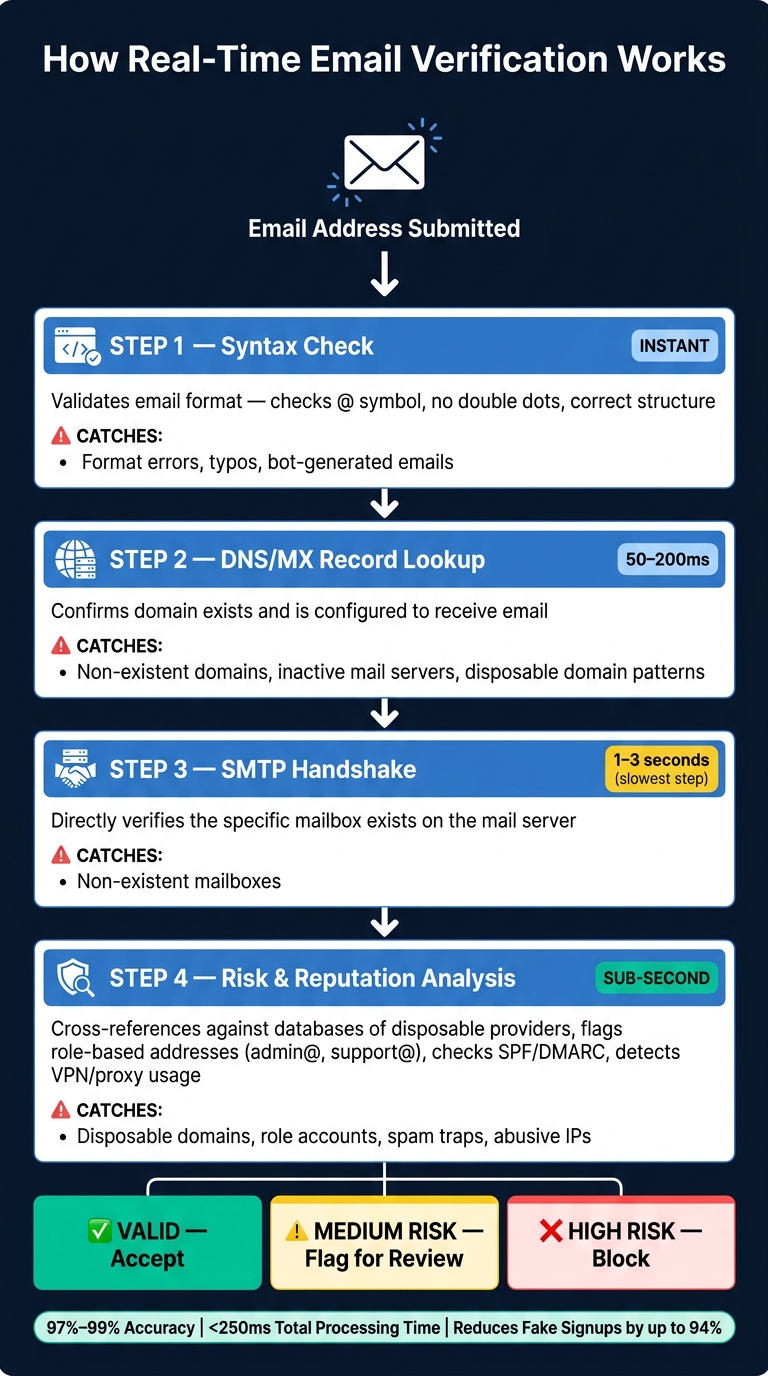
How Real-Time Email Verification Works: 4-Layer Fraud Detection Process
Key Technical Checks
Real-time email verification involves multiple layers, each designed to catch different types of invalid or fraudulent email addresses. The process starts with syntax validation, which ensures the email format is correct - checking for elements like the "@" symbol and avoiding double dots or other obvious errors.
Next comes the DNS/MX record lookup, which confirms that the email domain exists and is set up to receive messages. Many temporary or disposable domains either lack proper MX records or show patterns that identify them as burner email services. This step typically takes 50–200 milliseconds.
The SMTP handshake is a bit slower, taking about 1–3 seconds, but it directly checks if the specific mailbox exists.
Finally, risk and reputation analysis compares the domain against databases of known disposable providers and flags role-based addresses like "admin@" or "support@", which often correlate with higher spam complaint rates.
| Verification Layer | Speed | What It Catches |
|---|---|---|
| Syntax Check | Instant | Format errors, typos, bot-generated emails |
| DNS/MX Lookup | 50–200 ms | Non-existent domains, inactive mail servers |
| SMTP Handshake | 1–3 seconds | Non-existent mailboxes |
| Risk Analysis | Sub-second | Disposable domains, role accounts, spam traps |
These layers work together to ensure that email verification is both thorough and efficient, processing inputs in real time.
Real-Time Verification Workflow
The technical checks described above form the core of a seamless email verification system, often integrated directly into user signup forms. A common approach is to trigger verification when the user moves away from the email field ("on field blur"). This allows the API to run in the background while the user continues filling out other fields, ensuring that the result is ready by the time they hit "Submit."
To enhance security, verification requests should be routed through your backend. This protects your API key and prevents bots from bypassing the system.
It's also a good idea to set a 1–2 second timeout for API calls. This prevents delays that could frustrate legitimate users. If the verification process doesn’t complete within this timeframe, the system can soft-accept the email and flag it for later re-verification.
"Treating 'Unknown' as 'Invalid' is a self-inflicted wound. Most unknown addresses turn out to be valid on the next try." - EmailVerify.io
A tiered approach to handling results works best. Clean addresses can be accepted immediately. Disposable domains might prompt users to provide a permanent address, while catch-all or unknown results can be flagged for further review without outright rejection.
AbuseReport.org's API Features

AbuseReport.org's API takes email verification a step further by integrating advanced fraud detection signals. While most verification APIs stop at confirming whether an email address exists, AbuseReport.org adds layers of protection by analyzing broader fraud indicators. It provides a risk score and flags specific issues like disposable status, mailbox reachability, and valid MX records. Additionally, it checks for SPF and DMARC authentication, ensuring that the sending domain is properly configured and not associated with abusive activity.
Another standout feature is its IP-based intelligence. The API can detect if a user is connecting through a proxy, VPN, or hosting provider - potential signs of someone trying to hide their identity. Combined with a robust abuse database that tracks emails and IPs previously reported for malicious behavior, this multi-layered approach offers much more than a simple valid/invalid result, delivering deeper insights into the risk profile of each email address.
How to Implement Real-Time Email Verification
Where to Add Email Verification
To minimize fraud risks, it's critical to integrate email verification at key user touchpoints. These include signup forms, checkout pages, account recovery flows, and other areas where users provide their email addresses. Did you know that registration forms account for 45% of all form-based spam attacks? This makes them a top priority for verification.
Adding verification to checkout pages helps reduce order fraud, while account recovery flows protect against hijacking attempts. For even more protection, integrate verification into API endpoints that handle account creation or updates. To get started, audit your product and identify three to five areas where your system is most vulnerable to fraud. Once you've pinpointed these entry points, you can move on to secure integration.
Integration Methods
To protect your system and prevent abuse, use server-side API calls for email verification. This keeps your API key secure from bots, which could otherwise steal it and drain your verification credits. Always route verification requests through your backend for added safety.
If you need real-time feedback for users as they type, trigger the API call when the email field loses focus (on "field blur"). Implement a debounce window of 400–800ms to avoid overwhelming your system with unnecessary requests.
"The integration question isn't really 'how do I call the API.' That's an HTTP request... The question is what to do with the response." - EmailVerify.io
Platforms like AbuseReport.org simplify this process. They offer SDKs for popular programming languages like PHP, Python, and JavaScript. For teams that prefer not to write custom code, they also provide no-code integration options. This flexibility makes it easier to deploy verification across your system without needing to rebuild your infrastructure.
Risk-Based Decision Models
After integrating the verification system, focus on tailoring your response based on the risk level of each result. Using a risk-based decision model helps you prevent fraud while maintaining a smooth user experience.
| Result | Risk Level | Action |
|---|---|---|
| Valid | Low | Accept silently, no additional steps |
| Catch-all | Medium | Accept but flag for asynchronous re-verification |
| Role-based (e.g., info@) | Medium | Prompt: "Is this your personal email?" |
| Disposable | High | Block with message: "Please use a permanent email address" |
| Invalid (bad MX/DNS) | High | Block and ask the user to correct the address |
| Unknown (timeout/greylisted) | Low–Medium | Soft-accept and re-verify later in bulk |
Pay special attention to the "Unknown" category. If your verification API times out - set a hard limit of 1–2 seconds - soft-accept the email and flag it for bulk re-verification later. Automatically treating unknown results as invalid could cost you legitimate signups.
For high-value actions like payments or premium account upgrades, apply stricter rules. For example, a disposable email that might pass during a free trial signup should require additional verification, such as phone validation or manual review, before completing a purchase. Aligning your verification strictness with the importance of each action ensures smarter fraud prevention without unnecessary friction.
Measuring Results and Refining Policies
Key Metrics to Track
Once you've implemented technical checks and fraud prevention measures, it's crucial to track specific metrics to see the impact. Focus on three key areas: fraud detection, user experience, and business outcomes.
For fraud detection, monitor your disposable email rate (the percentage of signups using temporary email addresses) and signup velocity (sudden spikes in signups from a single IP or region, often linked to bot activity). When it comes to user experience, the false positive rate is essential - it shows whether legitimate users are being mistakenly blocked. On the business side, keep an eye on your trial-to-paid conversion rate. Once fraudulent accounts are filtered out, this metric often improves significantly, with increases ranging from 15% to 25% within the first quarter after implementing verification.
| KPI Category | Metric | What It Tells You |
|---|---|---|
| Fraud Detection | Disposable Email Rate | Percentage of signups using throwaway email addresses |
| Fraud Detection | Signup Velocity | Signs of bot attacks or coordinated campaigns |
| User Experience | False Positive Rate | Whether legitimate users are being blocked incorrectly |
| Technical Health | Verifier Timeout Rate | Reliability and speed of the API under load |
| Business Impact | Trial-to-Paid Conversion | Quality of leads post-fraud filtering |
Don't forget to monitor bounce rates consistently. This helps protect your sender reputation and ensures better email deliverability over time. Use these insights to adjust your verification policies as needed.
Policy Optimization
Your data isn't just for tracking - it's a tool for refining your verification rules. Platforms like AbuseReport.org make this easier with risk scoring and abuse data. For instance, if you notice a spike in disposable email usage from a specific channel, like a paid ad campaign, you can apply stricter rules to that traffic without disrupting organic signups. On the flip side, if your false positive rate increases, it might mean your thresholds are too strict and need adjustment.
A smarter approach involves moving beyond simple "allow or block" decisions. Instead, adopt a tiered system:
- Auto-approve low-risk users
- Auto-block high-risk patterns
- Flag medium-risk cases for additional steps, such as CAPTCHA or phone verification
"Getting validation right means catching the junk without blocking the real people. That balance is harder than it sounds." - APIVerve
Another useful practice is to schedule quarterly bulk re-verifications. Email addresses decay at a rate of 22% to 28% per year. Catching outdated emails early helps avoid high bounce rates and maintain list quality.
Refining your policies not only cuts down on fraud but also improves overall business performance.
Business Outcomes
The return on investment for email verification is impressive. Fraudulent accounts can cost businesses around $40,000 per month due to wasted infrastructure, support resources, and fraudulent transactions. Infrastructure waste alone makes up about 35% of these losses. Real-time email verification can reduce fake signups by up to 94%, and for every $1 invested, businesses see a return of $14.50.
Cleaner data doesn't just save money - it reduces legal risks, lowers operational costs, and improves email deliverability.
Conclusion
Fake account fraud has become a staggering $2.3 trillion global problem, yet only 23% of businesses have sufficient measures in place to combat it. These numbers highlight the pressing need for real-time email validation at the point of signup - a critical step that can save businesses from costly consequences.
By identifying disposable emails, nonsensical patterns, and bot-generated accounts right at signup, companies can prevent bad data from entering their systems. This proactive approach is far more cost-effective than cleaning up the mess later. Plus, the damage from high bounce rates can take anywhere from 4 to 12 weeks to repair, not to mention the financial losses businesses face every month.
AbuseReport.org offers a robust solution to this issue. Its API delivers a comprehensive suite of tools - MX, SPF, and DMARC validation, disposable email detection, global abuse intelligence, and VPN/proxy identification - all working together in less than 250 milliseconds. This ensures businesses can assess risks quickly and accurately while maintaining a smooth user experience. The result? Cleaner signups, improved user quality, and streamlined operations.
"It stops fake accounts from registering, blocks spam, and ensures suspicious users are detected before causing damage. Our SMTP bounce rates dropped significantly, underscoring its value." - Zeki, SaaS Founder
FAQs
Will real-time email verification block real customers?
When done right, real-time email verification helps prevent fraud while keeping things smooth for legitimate users. It operates quietly in the background, offering useful feedback if an email raises a red flag - like pointing out typos and suggesting corrections. By steering clear of overly rigid rules (such as rejecting valid email addresses with special characters) and adopting a risk-based approach, businesses can weed out fake accounts without creating unnecessary hurdles for genuine users.
What should I do with a "catch-all" or "unknown" result?
When dealing with catch-all or unknown email verification results, it’s important not to immediately label them as failures. Here’s why:
- Catch-all domains accept all incoming emails, but they don’t verify whether a specific mailbox exists. This creates a higher risk of emails bouncing.
- Unknown results occur when the verification process doesn’t gather enough reliable data to confirm the email’s validity.
To manage these scenarios, consider using a risk-based approach. Here’s how:
- Flag and monitor: Mark these addresses for closer observation or place them in a separate segment for targeted management.
- Re-verify later: Periodically re-check these addresses to see if more reliable data becomes available.
- Engage the user: Prompt users to double-check their email entries during the sign-up or submission process.
Additionally, leveraging real-time abuse detection tools can help you mitigate risks and maintain a cleaner email list.
Where should I add email verification in my product?
Integrating email verification into signup forms, checkout processes, and contact forms is a smart way to ensure accuracy and maintain clean data. To keep your API keys secure, always perform these checks on the server side.
Here are some common approaches to email validation:
- On-field blur: Trigger validation as soon as the user exits the email field, providing immediate feedback if there's an error.
- On-form submit: Validate the email when the entire form is submitted. While effective, this can introduce a slight delay.
- Asynchronous validation: Combine speed and thoroughness by performing quick checks upfront and running more detailed verifications in the background.
Each method has its strengths, so the best choice depends on your specific use case and user experience goals.